

Introduction
For years, software teams have been promised productivity breakthroughs—from better frameworks to faster cloud infrastructure to AI-powered coding assistants. Some helped. Many didn’t move the needle as much as expected.
Agentic AI feels different.
Not because it writes better code—but because it changes how work moves through the software development lifecycle. Instead of waiting for humans to orchestrate every step, agentic systems can plan, act, verify, and iterate toward a goal—with humans staying in control where it matters.
In my 15+ years working with software delivery teams, the biggest bottleneck was rarely coding speed. It was coordination—waiting on reviews, clarifications, tests, and handoffs. Agentic AI directly targets that invisible drag on delivery.
This guide walks through what agentic AI really means in software development, how teams are using it across the SDLC, and—most importantly—how to adopt it safely and effectively.
What Is Agentic AI in Software Development?
Agentic AI refers to AI systems designed to pursue goals, not just respond to prompts.
Instead of asking, “Write this function,” you give an agent a goal like: “Implement this feature safely and get it merged.”
From there, the agent can:
- Break the goal into steps
- Use tools (codebase, tests, CI, docs)
- Evaluate its own outputs
- Iterate until the goal is met—or escalate when it needs help
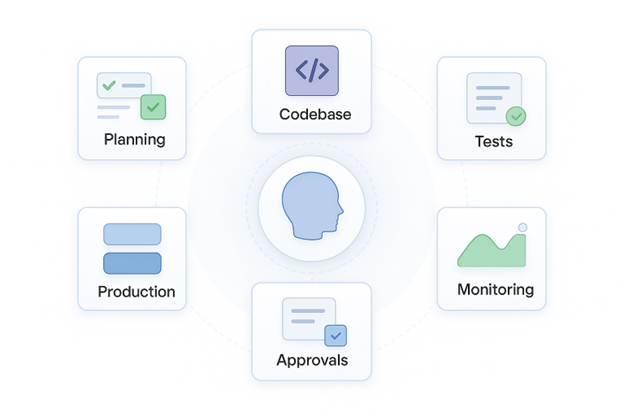
How this differs from copilots
Traditional AI assistants are reactive. They help when asked.
Agentic AI is proactive. It decides what to do next within boundaries you define.
Think of it as the difference between:
- A calculator (copilot)
- A junior engineer who can execute tasks independently—but still needs review (agentic AI)
Actionable takeaway: If your team struggles with follow-through between steps (code → tests → PR → fixes), agentic AI is more relevant than prompt-based tools.
Why Agentic AI Matters Now
Agentic AI didn’t appear out of nowhere. Three things made it practical:
- Better reasoning models that can plan multi-step work
- Tool integration (repos, CI, issue trackers, observability)
- Feedback loops that allow agents to verify and correct themselves
Modern software systems are complex, distributed, and fast-moving. Humans are great at design and judgment—but terrible at repetitive coordination. Agentic AI fills that gap.
AI adoption in software development is no longer experimental. According to the 2025 Stack Overflow Developer Survey, 84% of developers say they already use or plan to use AI tools in their development workflows, and 51% of professional developers report using AI tools daily.
This widespread adoption explains why teams are now looking beyond prompt-based assistance toward more autonomous, goal-driven systems.
Actionable takeaway: If your backlog grows faster than your ability to shepherd work through the pipeline, autonomy—not assistance—is what you’re missing.
How Agentic AI Works (A Simple Mental Model)
At a high level, agentic systems in software development consist of:
Core components
- Planner / Orchestrator – breaks goals into steps
- Specialist agents – coding, testing, reviewing, security, release
- Tools – repo access, CI pipelines, issue trackers, docs
- Memory – codebase context, prior decisions, failures
- Feedback loops – tests, linters, monitoring, alerts
Guardrails (non-negotiable)
- Permission boundaries (read vs write vs deploy)
- Approval checkpoints (PRs, releases)
- Full audit trails of agent actions
Actionable takeaway: Never deploy agentic AI without explicit boundaries. Autonomy without constraints doesn’t scale—it explodes.
Agentic AI Across the Software Development Lifecycle
This is where agentic AI moves from theory to impact. This shift toward agentic workflows is happening on top of already deep AI usage. Google’s 2025 DORA research shows that nearly two-thirds of developers report moderate to high reliance on AI tools in software development, with AI supporting work across multiple stages of the software development lifecycle—not just coding.
As AI becomes embedded across planning, testing, and operations, the natural next step is systems that can coordinate work across these stages autonomously.
1. Requirements and Planning
Agents can:
- Turn vague tickets into structured user stories
- Identify missing acceptance criteria
- Break epics into implementable tasks
Actionable advice: Use agents here as clarifiers, not decision-makers. Let them surface gaps before humans commit.
2. System Design and Architecture
Agentic systems can:
- Propose architecture options with trade-offs
- Generate API contracts and sequence diagrams
- Flag scalability or security concerns early
Actionable advice: Ask agents for alternatives, not final answers. Their value is in expanding your option space.
3. Coding and Refactoring
Agents excel at:
- Scaffolding services and components
- Applying consistent patterns across files
- Refactoring legacy code with test-first approaches
Actionable advice: Limit write access initially. Let agents prepare changes, then require human merge approval.
4. Testing and QA Automation
This is one of the highest-ROI use cases.
Agents can:
- Generate unit, integration, and edge-case tests
- Align tests to acceptance criteria
- Detect flaky or redundant tests
In many teams I’ve worked with, testing was the first thing skipped under deadline pressure. When agent-driven test generation was introduced, review speed improved—not because developers worked faster, but because reviewers trusted the safety net.
Actionable advice: Start here if you want quick wins with minimal risk.
5. Code Review and DevSecOps
Agentic AI can:
- Review PRs for logic, performance, and style
- Scan for security issues and license risks
- Enforce policy-as-code automatically
Actionable advice: Position agents as first reviewers. Humans focus on intent and architecture.
6. CI/CD and Release Engineering
Agents can:
- Triage build failures
- Suggest pipeline optimizations
- Generate release notes from commits and issues
Actionable advice: Let agents explain failures, not fix production automatically—at least initially.
7. Production Operations (SRE & Incidents)
In ops, agentic AI can:
- Correlate alerts and logs
- Suggest probable root causes
- Execute runbooks with approval
Actionable advice: Keep humans “on the loop,” not “out of the loop.” Visibility matters more than speed here.
Real Agentic Workflows (What This Looks Like in Practice)
Example: Feature from ticket to merged PR
- Parse ticket and clarify requirements
- Create branch and implement changes
- Generate tests
- Open PR and respond to feedback
Example: Bug fix from error log to release
- Analyze stack trace and recent changes
- Reproduce issue
- Patch with regression tests
- Prepare release notes
Actionable takeaway: Define workflows explicitly. Vague autonomy leads to unpredictable behavior.
Risks, Failure Modes, and How to Mitigate Them
Agentic AI introduces new risks.
Technical risks
- Hallucinated changes
- Silent regressions
- Tool misuse
Organizational risks
- Over-trust in automation
- Unclear accountability
- Compliance blind spots
In multiple automation initiatives I’ve seen fail, autonomy was added before guardrails. Agentic AI magnifies this mistake—small errors propagate fast when systems act independently.
Mitigation checklist
- Least-privilege permissions
- Mandatory tests and approvals
- Audit logs for every action
How to Adopt Agentic AI (A Practical Roadmap)
Step 1: Choose the right first use case
Good pilots:
- Test generation
- PR reviews
- Build failure triage
Avoid initially:
- Autonomous production deploys
- Security-critical workflows
Step 2: Define ownership and guardrails
Clarify:
- Who approves what
- When agents escalate
- How incidents are handled
Step 3: Measure before scaling
Track:
- Lead time
- Defect escape rate
- Review cycle time
- Cost per agent run
Every major tooling shift I’ve seen succeed treated adoption as a behavior change, not a tech upgrade. Agentic AI works best when teams redefine ownership—not when they chase autonomy.
Measuring ROI the Right Way
Look beyond “hours saved.”
Measure:
- Delivery predictability
- Quality and stability
- Reduced coordination overhead
- Engineer focus on high-value work
Actionable advice: If your metrics don’t change, your workflows didn’t change—regardless of tooling.
The Future of Software Development with Agentic AI
Software development is shifting from: “Help me write code” to “Help me deliver outcomes”
Industry analysts expect this trajectory to continue. According to a Zinnov industry report on AI in software development, AI adoption across the software development lifecycle is projected to approach 90% as teams integrate AI more deeply into planning, development, testing, and operations.
As adoption becomes near-universal, the competitive advantage will shift from using AI to using it responsibly and autonomously.
Engineers won’t disappear. Their role evolves—toward design, judgment, and stewardship.
Agentic AI doesn’t replace teams. It removes friction so teams can do their best work.
Conclusion
Agentic AI isn’t about replacing developers or automating everything overnight. It’s about reducing the invisible friction that slows good teams down—handoffs, waiting, rework, and coordination overhead.
What makes agentic AI different from earlier AI tools is its ability to carry work forward across steps, not just assist at individual moments. When used well, it allows teams to focus more on design, judgment, and outcomes—and less on shepherding tasks through the pipeline.
The teams that succeed with agentic AI won’t be the ones chasing full autonomy first. They’ll be the ones who:
- Start with high-ROI, low-risk workflows
- Define clear guardrails and ownership
- Measure impact beyond “time saved”
- Treat adoption as a change in working habits, not just tooling
Agentic AI is still early. That’s an advantage.
Teams that experiment thoughtfully now—while keeping humans firmly in the loop—will shape how software is built over the next decade, instead of scrambling to catch up later.
If there’s one takeaway: Start small, stay intentional, and design agentic systems to support good engineering discipline—not shortcut it.